
Box Office Rentals
Quick answer: Submit a rental request from the Box Office Rentals tab. The team confirms availability, sends a quote and rental agreement, then coordinates delivery. Request at least two weeks ahead.
The Ticketing Co. rents scanners so your box office runs without a problem on event day. Whether you need one unit for a small venue or several for a festival, submit a rental request and the team will confirm availability and coordinate delivery.
Also need DJ equipment?
The Ticketing Co. rents CDJ 3000s, DJM 900nxs2, and other DJ gear in the New York City area.
Contact equipment@theticketing.co for availability and pricing.
How to submit a rental request
Go to the Box Office Rentals tab in your dashboard, or reach out to a Ticketing Co. team member directly.
Fill in all required fields marked with an asterisk. Optional fields can be left blank.
Review your information, then click Submit Scanner Rental Form.
The team will review your request and reach out to confirm equipment availability and delivery details.
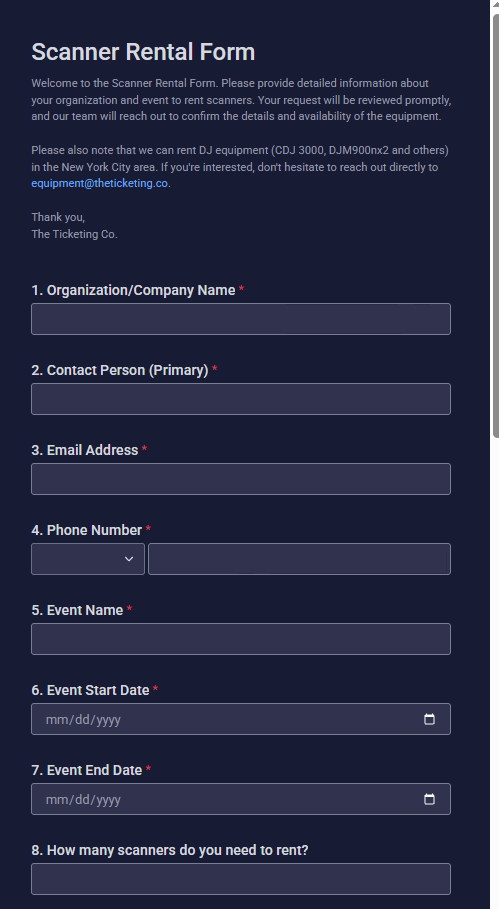
Scanner Rental Form: required fields including event details and quantity
What happens after you submit
The team reviews your request and checks equipment availability for your event dates.
A member of The Ticketing Co. team will contact you at the email or phone number provided to confirm details.
You will receive a quote on the rental.
If the quote is approved, you will receive a rental agreement to sign before the equipment is dispatched.
Delivery logistics are coordinated based on your specified address and required date.
You will receive the scanner by mail and return it after your event, unless it is a long-term rental.
Important Scanner availability is limited around peak event weekends. Submit your request at least two weeks before your event to confirm availability.
Tips for a smooth rental
Double-check your delivery address. Incorrect addresses delay equipment arrival.
Include a mobile number for the delivery contact so the logistics team can reach someone on site.
If you are not sure how many scanners you need, include your expected attendance in the Special Requirements field. The team will recommend the right quantity.
For multi-day events, note any dates when scanners are not needed so pickup can be planned accordingly.